
Marking a Member Done
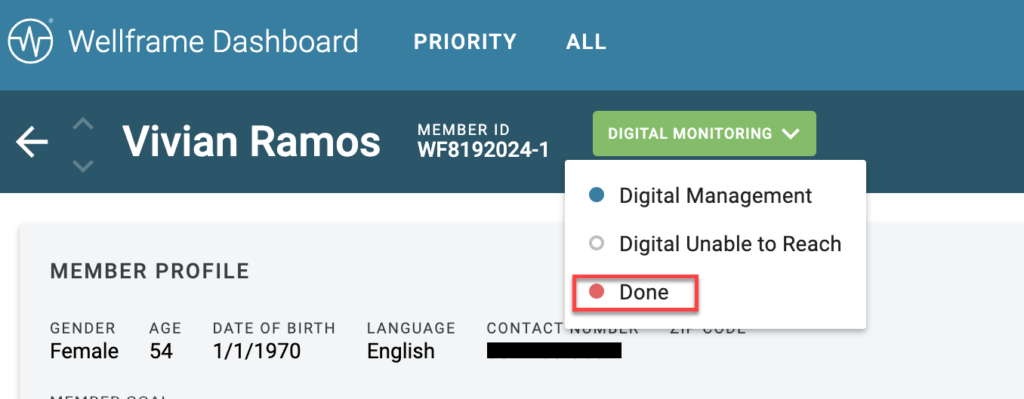
To mark a member as Done, select the Done button from the Member Status indicator on the Member Profile. You might do this for a member who asks to unenroll from the program, or if a member has stopped engaging with their care team.
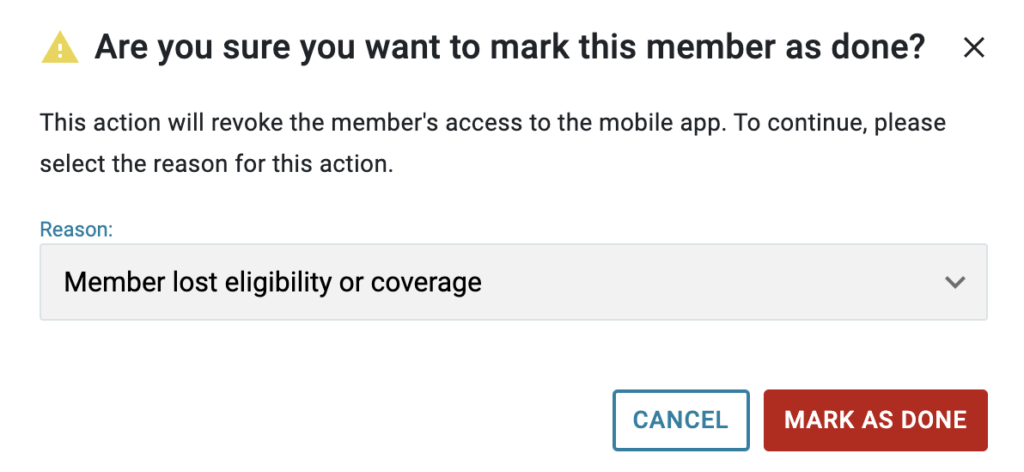
When you mark a member as Done, a popup prompts you to select a reason for the action. The selected reason is saved in the App Access Info tab under Member Settings.
Member Experience After Being Marked Done
After a member is marked as Done, a banner displays on the member profile indicating the change in status. The member experience in the mobile app changes as follows:
- Login credentials remain valid.
- A persistent dialog displays in the app, communicating that the member no longer has active access to care management and presents contact information.
- Push and local notifications are paused.
- Health data tracking through Health Connect (Android) and Apple Health (iOS) is paused.
- The member can still view the status dialog and contact information.
Note: You can still edit the member’s Member Details (E-mail, Phone, Member ID), if needed, should the member decide at a later point that they would like to re-engage with the care team.
Re-Engaging a Member Marked as Done
Members can be re-engaged through the Self-Service Re-Enrollment feature, which enables returning members to instantly come back to care management through a re-enrollment link delivered by templated message or marketing outreach. The link works across the iOS app, Android app, and Web Portal. You can also re-enroll a member manually from the dashboard. For full instructions, refer to Re-enrolling a Done Member.