
Ecosystem Report
Purpose:
This report provides a comprehensive view of the digital member ecosystem. It is designed to monitor onboarding trends, member states, program participation, and staff activity across the care continuum. There are 2 versions of this report – standard and by Line of Business.
Key Contents:
- Population Overview:
- Total targeted members, onboarded members year-to-date (YTD), and members with platform access.
- Member State Distribution:
- Current member statuses (e.g., Done, Invited, Digital Monitoring)
- Trended and monthly snapshots of member states
- Reasons for members being marked “Done” (e.g., lost to follow-up, goal completion)
- Care Area & Line of Business Insights:
- Staff-invited members by enrollment care area
- Share of monthly member states by care area and engagement type
- Onboarding Trends:
- Monthly onboarding volumes (staff vs. self) over the past 12 months
- YTD onboarding breakdown
- Staff invitation trends and conversion rates
- Program Subscriptions:
- Subscription metrics by program (e.g., Welcome Program, Wellness & Prevention, Care Transitions)
- Active vs. ended subscriptions, median days on program
- Percent share of total subscriptions YTD
- Staff Metrics:
- Total staff, staff with access, and those assigned as primary
- Median number of members per primary staff
- Team representation
Usage:
This report supports ecosystem-wide performance monitoring, identifies engagement gaps, and informs strategic decisions around staffing, program utilization, and member outreach.
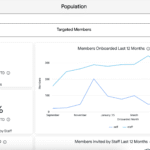
Dashboard Filters
- Member Line of Business
- Access Code Prefix
- Business Unit Code
- Employer Group
Definitions
Population Section
| Population | Filters | ||||
| Field | Description | Member Line of Business | Access Code Prefix | Employer Group | Business Unit Code |
| Members Onboarded | Members onboarded during the current calendar year | X | X | X | X |
| Staff Conversion Rate YTD | Percent of staff-invited members YTD who have onboarded | X | X | X | X |
| Members Onboarded Last 12 Month | A count of members who onboarded by month over the last 12 complete months, broken out by type (staff or self). | X | X | X | X |
| Self vs Staff Onboards YTD | The share of staff and self onboards year-to-date | X | X | X | X |
| Members Invited by Staff Last 12 Months | A count of members invited by staff by month over the last 12 complete months | X | X | X | X |
| Share of Monthly State (Not Done/Terminated) | Share of member state or status over the last 12 complete months. Prior to the implementation of member states, the member status is used. Member status is a hierarchical rank applied to a member in this order: Terminated Member’s profile was deleted via “Delete Duplicate Profile” Done Members marked done; does not need to be onboarded Maintenance Onboarded members who have a maintenance label applied Onboarded Onboarded members not marked done or on maintenance Staff-invited Members who were invited by a staff member (added to the dashboard), but have not onboarded Self-started Members who have started, but not completed, the onboarding process using a self-onboarding access code This graph excludes members terminated or marked done. Statuses are applied based on the last day of each month. Members do not need to be currently eligible to be counted. | X | X | X | X |
| Trended Member State | Trended member counts by their member state or hierarchical status over the last 12 complete months. Prior to the implementation of member states, the member status is used. The rank is: Terminated Member’s profile was deleted via “Delete Duplicate Profile” Done Members marked done; does not need to be onboarded Maintenance Onboarded members who have a maintenance label applied Onboarded Onboarded members not marked done or on maintenance Staff-invited Members who were invited by a staff member (added to the dashboard), but have not onboarded Self-started Members who have started, but not completed, the onboarding process using a self-onboarding access code This graph excludes members who are done. States/statuses are applied based on the last day of each month and members must also be eligible on that day. | X | X | X | X |
| Current Member State – Eligible Members | Share of currently eligible members’ states. Prior to the implementation of member states, the ecosystem-defined status is used. This is a hierarchical rank applied to a member in this order: Terminated Member’s profile was deleted via “Delete Duplicate Profile” Done Members marked done; does not need to be onboarded Maintenance Onboarded members who have a maintenance label applied Onboarded Onboarded members not marked done or on maintenance Staff-invited Members who were invited by a staff member (added to the dashboard), but have not onboarded Self-started Members who have started, but not completed, the onboarding process using a self-onboarding access cod | X | X | X | X |
| Staff-Invited Members by Enrollment Care Area | A count of members invited by staff year-to-date by the care area associated with the access code they received | X | X | X | X |
Onboarded Members Section
| Onboarded Members | Filters | ||||
| Field | Description | Member Line of Business | Access Code Prefix | Employer Group | Business Unit Code |
| Members with Access | A count of members who are eligible and have onboarded, and therefore currently have access to the app. This excludes members marked done. | X | X | X | X |
| Eligible Members Marked Done | A count of members who are eligible and have onboarded, and are currently marked done. | X | X | X | X |
| Eligible Members in Digital Monitoring | A count of members who are eligible and are in the Digital Monitoring state. If member states is not live, the maintenance label is used. | X | X | X | X |
| Onboarded Members Never Logged In | A count of eligible and onboarded members who have not opened the app since the date of onboard. | X | X | X | X |
| Members Marked Done By Month | A count of members marked done each month trended over the last 12 complete months. For a member to appear, they need to have been marked done for at least one day. If a member is marked done more than once (after re-enrollment, for example), they will appear for each month they were marked done. | X | X | X | X |
| Reasons Marked Done YTD | Of members who are currently marked done and were marked done during the calendar year, this shows the reasons they were marked done and the number of members with this reason selected. | X | X | X | X |
| Avg Major Subs – Members w Access | For members that are currently eligible and onboarded (and not marked done), this is the average number of major subscriptions they have been assigned during their lifecycle. This excludes the Digital Intake Assessment, Biometrics programs, and the Welcome program. It also excludes any standalone surveys and assessments. | X | X | X | X |
| Avg Subs – Members w Access | For members that are currently eligible and onboarded (and not marked done), this is the average number of subscriptions they have been assigned during their lifecycle. This excludes standalone surveys and assessments. | X | X | X | X |
| Digital Management Members without Active Subscription | A count of members in the Digital Management state that do not have a current subscription to a non-assessment/non-survey program. If member states is not live, onboarded and eligible members not marked done or on maintenance are used. | X | X | X | X |
| Digital Management Members Missing Primary | A count of members in the Digital Management state that do not have a primary care manager assigned to them. If member states is not live, onboarded and eligible members not marked done or on maintenance are used. | X | X | X | X |
Programs Section
| Programs | Filters | ||||
| Field | Description | Member Line of Business | Access Code Prefix | Employer Group | Business Unit Code |
| Program Name | Name of program | X | X | X | X |
| Program Length | Length of program | X | X | X | X |
| Subscriptions YTD | Number of subscriptions that were active for at least a day in the calendar year. This includes subscriptions started in the calendar year, that are currently active, or that ended in the calendar year. | X | X | X | X |
| Percent of Subscriptions YTD | Share of total subscriptions active for at least a day in the calendar year. | X | X | X | X |
| Subscriptions Started YTD | Number of subscriptions that began in the calendar year (subscription start date is in the calendar year). | X | X | X | X |
| Active Subscriptions | Number of active subscriptions. These are subscriptions that have started and have not yet ended. | X | X | X | X |
| Median Days on Subscription (Ended YTD) | For the subscriptions that were active for at least a day during the calendar year, and have now ended, the median number of days on the subscription. | X | X | X | X |
Staff Section
Staff who report themselves as managers in the dashboard are not counted in these metrics.
| Staff | Filters | ||||
| Field | Description | Member Line of Business | Access Code Prefix | Employer Group | Business Unit Code |
| Staff with Access | Number of staff with access to the dashboard. | ||||
| Staff Assigned as Primary | Number of active staff assigned as a primary care manager for at least one member. | ||||
| Median Primary Members Assigned | Of staff assigned as a primary care manager, the median number of primary members they are assigned. | ||||
| Teams Represented | Number of teams represented by the staff with access. |
Last Updated: